
Free tool, no signup

Free tip pool and tip out calculator

Split tonight's tips for the whole shift in seconds, by percentage, hours or points. Then download the tip sheet as a PDF or print it.

A server shares a set percentage with support roles.

Tip out based on
Servers on shift
Tip out to support roles
Your shift plan
Set the rules your team uses. Use percentages, hours or points to compare a split. Choosing a state labels your sheet; it does not change the math.

Download this tip sheet

Save your current split as a PDF, ready to review or print. No email needed.

Planning tool, not legal or tax advice. Tip rules vary by state and role, and they change. Check the rules for each of your locations.

Integrates with the tools you already use

For multi-location groups

What splitting tips by hand costs your group

The calculator handles one shift. Your managers do it every shift, at every location. Slide to your numbers.

12
14
20 min
$30
2,912

manager hours a year spent on tip math

$87,360in manager time
8,736tip splits done by hand

Ferry handles the tip calculations so managers can spend less time rebuilding the split after each shift.

Get Ferry pricing for 12 locations

Estimate based on your inputs. Ferry is priced per location.

A BJ's Restaurant and Brewhouse at dusk
BJ's RestaurantsNASDAQ: BJRI · Casual dining

Case study

How BJ's Restaurants eliminated cash tip payouts across 200+ locations

66%less cash to carry
200+locations live
30states
Oneview across locations
"Since launching this card program, we've reduced our cash-carrying costs by over 66 percent and increased both team member and manager retention rates to pre-Covid levels."
Jake GuildSVP and Chief Accounting Officer, BJ's Restaurants (2024)
Read the full BJ's case study

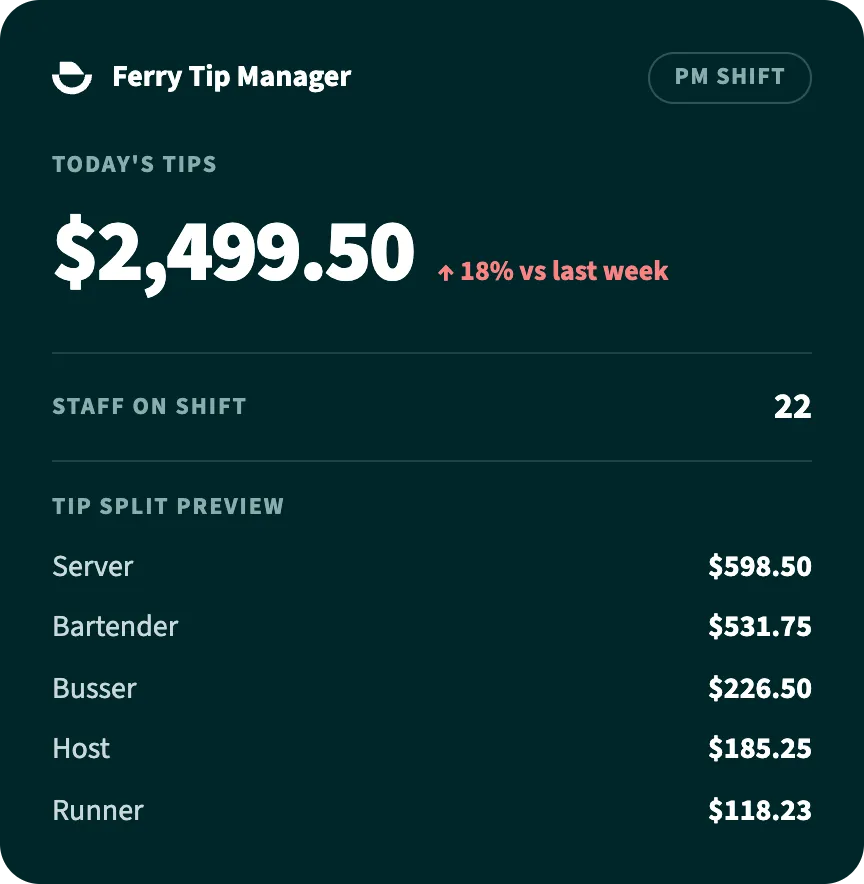
Ferry Tip Manager

Everything this calculator does, every shift, without anyone touching it

Connect your POS, set your rules once and Ferry runs them at every location.

What staff say about getting paid with Ferry

Ferry Pay reviews on the App Store

★★★★★

"Ferry has been a breath of fresh air since my company switched. The customer service was quick and responsive ( I had a few issues setting it up) and the app is helpful in letting me know when I get my deposits."

Wafflz32
App Store review · Aug 2024
★★★★★

"Super simple app to use, love how fast transfers are and how fast money is deposited into my ferry account. Super happy my employer switched to ferry."

Ariana O.
App Store review · Jul 2024
★★★★★

"Best pay app I've ever had with any tip job!"

Allie McBeal
App Store review · Sep 2024

FAQ

Tip pooling questions, answered straight

From splitting a shift to what switching to Ferry looks like.

Still have a question?Ask it live in a 15-minute call.

Pick a time
How do I use this tip pooling calculator?

Choose tip out or tip pool, then enter your shift numbers. Tip out shares a percentage of tips or sales with support roles. Tip pool divides one total by hours, points or points × hours.

Review each share, then download the PDF or print the sheet. This calculator models the split you enter; it does not decide who is eligible to receive tips.

What's the difference between a tip out and a tip pool?

A tip out is a server sharing a set percentage with support roles like bar and bussers.

A tip pool puts everyone's tips in one pot and splits it by hours, points or role. Plenty of restaurants run both.

What's a typical tip out percentage?

Usually 1% to 5% per support role, taken from either tips or sales. The bigger choice is which base you use:

  • % of sales: predictable for support staff, but a server can owe more than they made on a low-tip night.
  • % of tips: always in proportion to what actually came in.

The calculator above does both. Toggle "% of sales" to compare.

How long does Ferry take to set up?

Ready customers may go live the same day. Timing depends on your tools and setup. Ferry can walk you through what you need before you start.

Will it work with our POS and payroll?

Almost certainly. Ferry lists Toast, Square, Clover, Lightspeed, 7shifts, ADP, Gusto and Paychex among its connections. Confirm your specific setup with Ferry.

Running something else? Ferry works from payroll data or a simple CSV export.

What does Ferry cost?

A per-location quote for your setup. Ferry is priced per location, so you only pay for what you run. Book a demo and get a quote for your group.

Do we have to stop paying tips in cash or through payroll?

No. Tip Manager calculates every split and you pay out exactly like you do today.

When you're ready to stop handling cash, add Ferry Pay. Tips land on a Visa Pay Card at shift end, and staff don't need a bank account.

What happens when shifts change or someone clocks in late?

Ferry handles it automatically. Late clock-ins and shift changes flow in from your POS and schedule, and everyone sees their final number at close. Nobody redoes the math.

We run one location. Is Ferry overkill?

No. Ferry runs one café the same way it runs 200 restaurants, and your setup depends on the tools and rules you use. Add locations whenever you grow.

15 minutes with Tim

Watch your tip math run itself

Bring one real shift. We'll run it through Ferry live, with your rules and your POS.

  • Your pool rules set up live, in minutes
  • Exactly what each role sees at close
  • A per-location quote for your group

"I had a different card before this and got paid every other Tuesday but now I get paid everyday."

Jeinste1, Ferry Pay user, App Store review

See Ferry in action

Bring your rules. We’ll run the split.

See how Tip Manager works with your locations and tools, then get a per-location quote.

Book a demo with Ferry

Choose your next step on Ferry’s booking page.

Free Tip Pool and Tip Out Calculator

Split tonight's tips in seconds – by percentage, by hours, or both. Built by Ferry, the tip management platform for multi-location restaurants.

$
Role% of tipsGets
Server keeps$0.00
That is more than 100% of the tips. Trim the percentages to balance the pool.

Free calculator from Ferry – automated tip management for restaurants.

This calculator is a planning tool, not legal or tax advice. Tip pooling and tip-out rules vary by state and by role, and they change. Check the rules that apply to your locations.

See it run your own numbers.

Send us one real shift — your pool rules, roles and POS. We'll show you exactly what Ferry calculates, and what your staff sees when it pays out.

Already use Ferry at work? This form is for restaurants evaluating Ferry. For help with your account, card or getting paid, visit Employee Support.

Want Ferry to do this every shift, automatically?

Book a demo
Two restaurant staff working out tip splits on a tablet and laptop.

The math is the easy part

A calculator sorts out one night at one location. But tip pooling is a nightly job – someone splitting the take across roles, redoing it when a shift changes, handling the cash, and hoping the records hold up if anyone ever asks. Ferry does the whole thing automatically.

Tips are pulled straight from your POS, split by the rules you set – percentages, points, hours, or a mix – and sent to your team digitally. No spreadsheet, no envelope of cash, no manager doing sums at midnight.

What's the difference between a tip out and a tip pool?

A tip out is when tipped staff share a percentage of their tips with support roles like bussers and bar. A tip pool combines everyone's tips and splits them by an agreed method – hours worked, points, or role.

What's a typical tip out percentage?

It varies by restaurant, but support roles commonly receive somewhere between 1% and 5% of sales or tips each. The right split depends on your team structure and, importantly, the rules in your state.

Is tip pooling legal?

Tip pooling is legal under federal law, but the rules on who can participate vary by state and change often. Ferry tracks multi-state tip pooling rules so your split stays compliant as laws move.

Doing this by hand every night, across every location? That's exactly what Ferry automates.

Book a demo