











The short answer
Choose Ferry if the split is the hard part: Tip Manager applies your rules for roles, shifts and locations, a manager can confirm each pool before payout, and Ferry Pay pays to a Pay Card that needs no other bank account. Kickfin fits a simple split where staff want deposits to their bank of choice.
For more options, see eight Kickfin alternatives tested on one closing shift.
Ferry vs Kickfin vs cash and spreadsheets at a glance
| Capability | Ferry | Kickfin | Cash and spreadsheets |
|---|---|---|---|
| Pools split by your rules for roles and hours | Built in | Built in | Partly, or varies |
| Manager approval before payout | Built in | Partly, or varies | Partly, or varies |
| Calculate first, keep your current payout | Built in | Partly, or varies | Not available |
| Digital tip payout, no cash on hand | Built in | Built in | Not available |
| Payout without a bank account | Built in | Partly, or varies | Built in |
| Deposit straight to the worker's own bank | Partly, or varies | Built in | Not available |
| Earned wage access option | Built in | Partly, or varies | Not available |
- Built in
- Partly, or varies
- Not available
Kickfin's clear win is the direct bank deposit. Ferry's half mark there is the transfer off the Pay Card, a second step. Kickfin's half mark on payouts without a bank account is its payroll option; it describes no pay card. Express Pay is Ferry's earned wage access program, under employer and program conditions. A half mark means partial, varies by setup, or no public source confirms it, so ask to see it in the demo.
Where Kickfin falls short, according to users
Staff like same-day money in their own bank. The friction shows up in fees, fixes and admin, so turn each point into a demo question.
Fees can land on staff
Some restaurants pass a per-deposit fee to workers, and some workers report learning about it only after the switch.[1]
Fees vary by employer
Reported amounts range from 50 cents to $1 a deposit, so ask who pays and how much.[1]
Paid means paid
Money goes out when a manager submits the session; later POS changes are re-run for review, not adjusted out of a held balance.[2]
Bank and debit card needed
Workers enroll with their own debit card, and no pay card is described for staff without a bank account.[3]
No worker app
Staff enroll from a secure link by text or email and check history on the web.[3]
Sources
- [1] Reddit, r/Serverlife: Kickfin service fee
- [2] Kickfin blog: automated tip reconciliation (kickfin.com/blog/automated-tip-reconciliation/)
- [3] Kickfin: for employees (kickfin.com/for-employees/)
How Ferry gets the split right first
Answer "why did my tips change?" from one screen
Tip Manager takes sales from your POS and hours from your time system, then applies your pooling rules. Kickfin also auto-calculates pools and shares; Ferry shows how each share was built.
- Tip breakdown by personDirect tips, indirect tips and tip-outs side by side for everyone on the shift.
- Shift detailsClock-in, clock-out and hours behind each share.
- Tips payableOne final number per person, ready to pay out or hand to payroll.
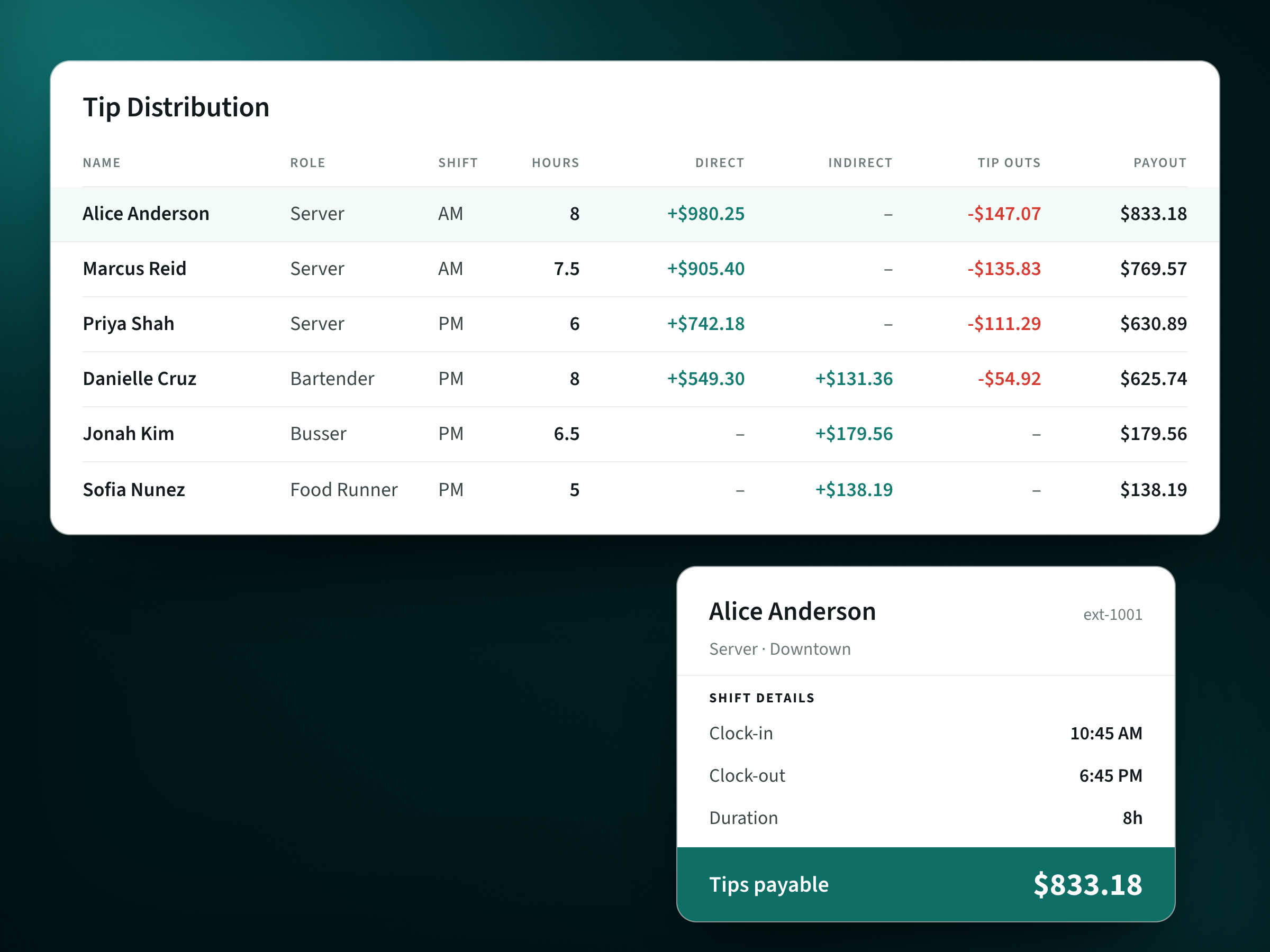
Tip Distribution for the shift. Alice Anderson, Server, AM, 8 hours: direct +$980.25, tip outs -$147.07, payout $833.18. Marcus Reid, Server, AM, 7.5 hours: direct +$905.40, tip outs -$135.83, payout $769.57. Priya Shah, Server, PM, 6 hours: direct +$742.18, tip outs -$111.29, payout $630.89. Danielle Cruz, Bartender, PM, 8 hours: direct +$549.30, indirect +$131.36, tip outs -$54.92, payout $625.74. Jonah Kim, Busser, PM, 6.5 hours: indirect +$179.56, payout $179.56. Sofia Nunez, Food Runner, PM, 5 hours: indirect +$138.19, payout $138.19. Shift details for Alice Anderson (ext-1001), Server, Downtown: clock-in 10:45 AM, clock-out 6:45 PM, duration 8h. Tips payable $833.18.
What this Ferry screen shows: Tip Distribution for the shift. Alice Anderson, Server, AM, 8 hours: direct +$980.25, tip outs -$147.07, payout $833.18. Marcus Reid, Server, AM, 7.5 hours: direct +$905.40, tip outs -$135.83, payout $769.57. Priya Shah, Server, PM, 6 hours: direct +$742.18, tip outs -$111.29, payout $630.89. Danielle Cruz, Bartender, PM, 8 hours: direct +$549.30, indirect +$131.36, tip outs -$54.92, payout $625.74. Jonah Kim, Busser, PM, 6.5 hours: indirect +$179.56, payout $179.56. Sofia Nunez, Food Runner, PM, 5 hours: indirect +$138.19, payout $138.19. Shift details for Alice Anderson (ext-1001), Server, Downtown: clock-in 10:45 AM, clock-out 6:45 PM, duration 8h. Tips payable $833.18.
Set the split once for every role
Tip Manager applies your rules for roles, shifts and locations, so a busser and a bartender each get their share without a spreadsheet at close.
- Role poolsEvery role starts with its own pool of direct or indirect tips.
- Hours-worked splitEach pool divides by the hours people actually worked.
- Shared poolsBundle roles into one pool, such as a support pool for bussers.
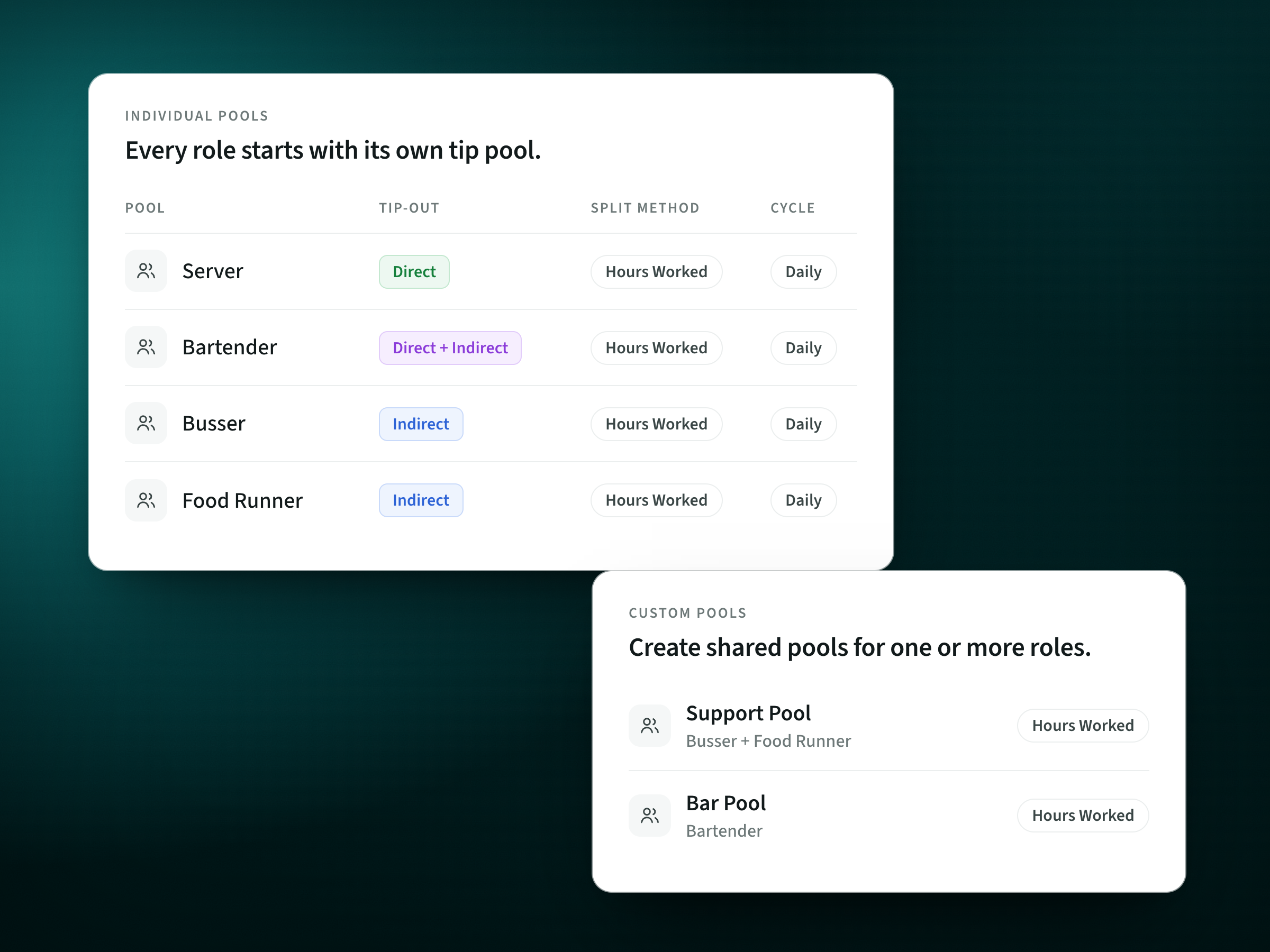
Individual pools: every role starts with its own tip pool. Server is Direct, Bartender is Direct + Indirect, Busser is Indirect and Food Runner is Indirect. Each pool splits by Hours Worked on a Daily cycle. Custom pools: create shared pools for one or more roles. Support Pool combines Busser and Food Runner. Bar Pool covers Bartender. Both split by Hours Worked.
What this Ferry screen shows: Individual pools: every role starts with its own tip pool. Server is Direct, Bartender is Direct + Indirect, Busser is Indirect and Food Runner is Indirect. Each pool splits by Hours Worked on a Daily cycle. Custom pools: create shared pools for one or more roles. Support Pool combines Busser and Food Runner. Bar Pool covers Bartender. Both split by Hours Worked.
Catch a wrong number before money moves
Choose automatic processing or manual approval, where a manager confirms each pool before payout. Fixing an error before it is sent is cheaper than chasing paid money back.
- Pause by locationStop processing at one store while tips keep collecting.
- Manual approvalA manager confirms each pool before payout.
- Daily scheduleCutoff, calculation, finalization and a reconciliation report at set times.
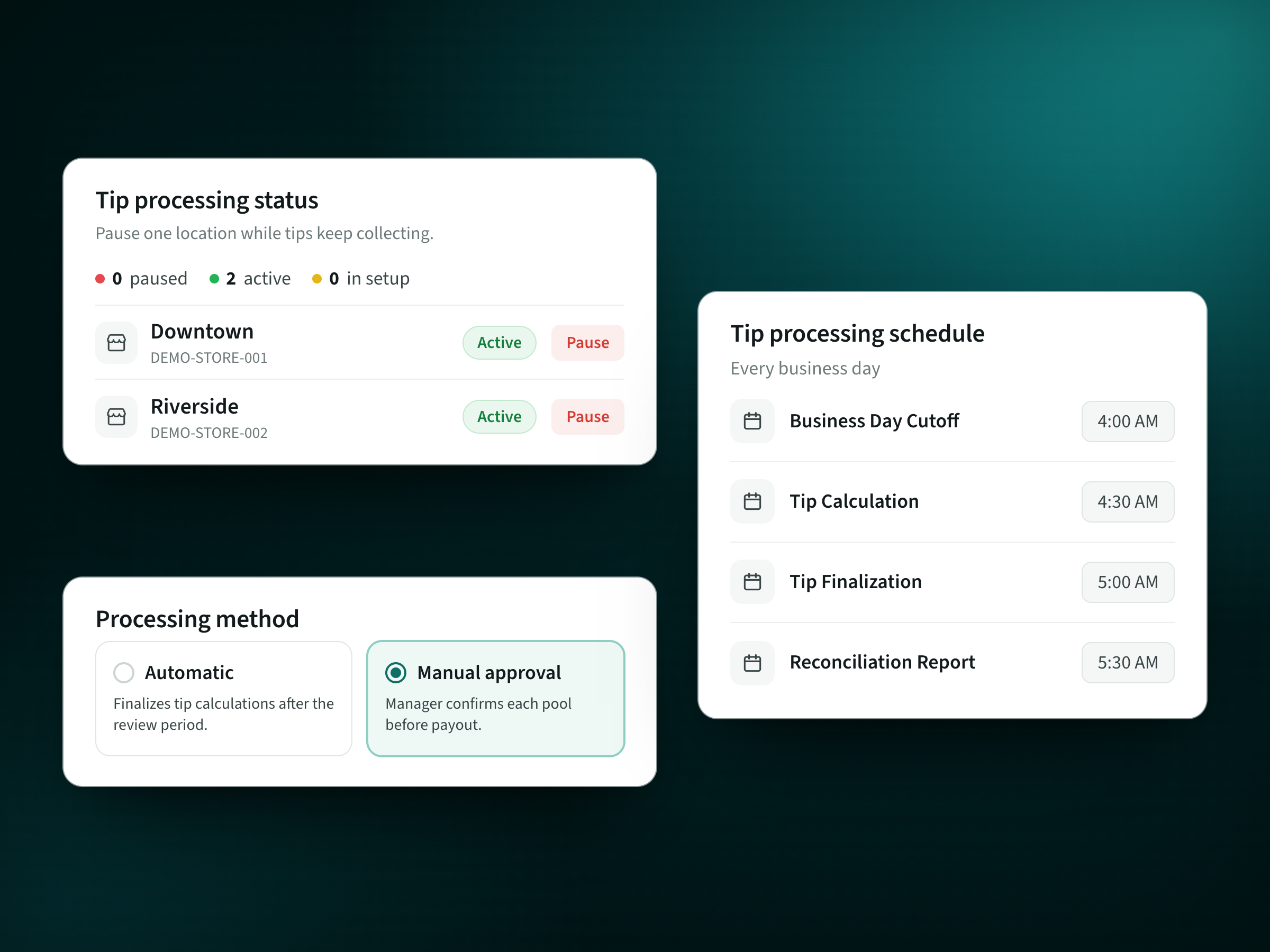
Tip processing status: 0 paused, 2 active, 0 in setup. Downtown (DEMO-STORE-001) and Riverside (DEMO-STORE-002) are Active, each with a Pause button, so one location can pause while tips keep collecting. Processing method: Automatic finalizes tip calculations after the review period; Manual approval, selected, means a manager confirms each pool before payout. Tip processing schedule, every business day: Business Day Cutoff 4:00 AM, Tip Calculation 4:30 AM, Tip Finalization 5:00 AM, Reconciliation Report 5:30 AM.
What this Ferry screen shows: Tip processing status: 0 paused, 2 active, 0 in setup. Downtown (DEMO-STORE-001) and Riverside (DEMO-STORE-002) are Active, each with a Pause button, so one location can pause while tips keep collecting. Processing method: Automatic finalizes tip calculations after the review period; Manual approval, selected, means a manager confirms each pool before payout. Tip processing schedule, every business day: Business Day Cutoff 4:00 AM, Tip Calculation 4:30 AM, Tip Finalization 5:00 AM, Reconciliation Report 5:30 AM.
Prove every tip payout went through, by date
Ferry Pay pays tips on your schedule to the Ferry Pay Card, a Visa prepaid payroll card funded in under 60 seconds that needs no other bank account. Each payout then lands in the worker's dated history.
- Tip payment historyEvery payout for each person, by date.
- Automatic paymentsTips pay out on the schedule you set.
- Payment statusEach payment shows whether it went through.
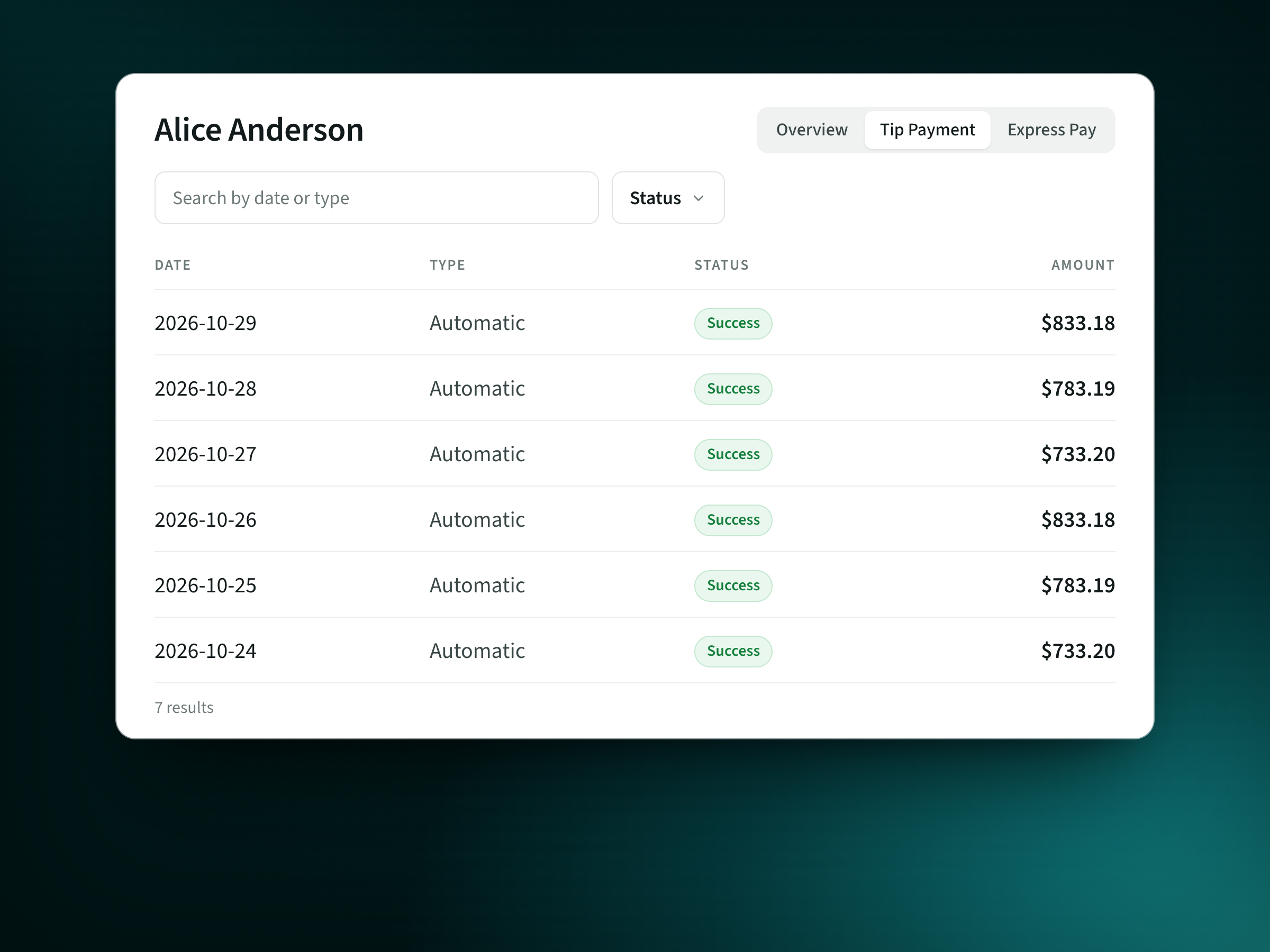
Alice Anderson, Tip Payment tab, with a search by date or type and a Status filter. Payments, all Automatic with status Success: 2026-10-29 $833.18, 2026-10-28 $783.19, 2026-10-27 $733.20, 2026-10-26 $833.18, 2026-10-25 $783.19, 2026-10-24 $733.20. 7 results.
What this Ferry screen shows: Alice Anderson, Tip Payment tab, with a search by date or type and a Status filter. Payments, all Automatic with status Success: 2026-10-29 $833.18, 2026-10-28 $783.19, 2026-10-27 $733.20, 2026-10-26 $833.18, 2026-10-25 $783.19, 2026-10-24 $733.20. 7 results.
Proof: BJ's Restaurants moved tips off cash with Ferry
- 200+BJ's Restaurants locations
- 30states
- 66%+lower cash-carrying costs
Since launching this card program, we've reduced our cash-carrying costs by over 66 percent
That is one chain's result on cash-carrying costs, not payroll or labor cost, and Ferry runs the same calculation at a single location. Read the BJ's Restaurants story.
Get set up with Ferry
Book a demo with one real shift
Send your pool rules, roles and POS, and Ferry shows what it calculates and what staff see when the money lands.
Connect your POS and set your rules once
Toast, Square, Clover, Lightspeed and more connect directly, or start from a CSV export. No HRIS integration is needed to get started.
Go live and pay out your way
Ready teams can be up the same day, and most run a first automated payout within days. Keep your current payouts, or add Ferry Pay with instant-issue cards kept at each location.
Ferry vs Kickfin FAQs
Is Ferry a good Kickfin alternative?
Yes, when the split is the hard part. Ferry fits restaurants with several roles, tip-outs and staff who want each number explained, plus teams where some workers have no bank account. If the split is simple and everyone wants deposits to their own bank, Kickfin covers that job.
What does switching from Kickfin cost?
Ferry prices each location by quote, based on your setup, and publishes no fixed price. Because Tip Manager can run before Ferry Pay, staff do not have to change how they get paid on day one. Ferry does not publish contract or cancellation terms, so get them in writing next to Kickfin's quote.
How long does it take to get set up with Ferry?
Ready teams can be up and running the same day, and most operators connect their POS, configure their pools and run a first automated payout within days of signing. Timing depends on your tools and how your rules are set up, so treat same day as possible, not promised. No HRIS integration is needed to get started.
Which POS and payroll systems does Ferry work with?
Ferry names Toast, Square, Clover, Lightspeed, POSitouch and Aloha among POS systems, and ADP, Gusto, Paychex and 7shifts for payroll and scheduling. It can also work from a CSV export. A logo on the list does not promise every workflow, so confirm your exact setup and versions in the demo.
Do workers pay fees with Ferry?
The Ferry Pay Card has no activation, monthly or inactivity fee, and moving money to a bank by standard transfer costs $0. In-network MoneyPass ATM withdrawals carry no fee; out-of-network ATM withdrawals in the US cost $3, and an instant transfer to a debit card costs 1.75%, up to $25. With Express Pay, standard transfers are free and an instant transfer costs a flat $2.99, shown before the worker confirms.
Can I keep Kickfin for payouts while I try Ferry?
Ferry Tip Manager works on its own with the POS and payroll you already have, so you can keep paying out the way you do today and add Ferry Pay later. Public sources do not document a hand-off from Tip Manager into Kickfin, so ask Ferry to show that step with your account in the demo.
Does Ferry work for more than one location?
Yes. Tip Manager sets pool percentages, points, tip-outs and minimums by role, location or brand, and you can drill down by region, brand, store or shift. BJ's Restaurants runs Ferry across 200+ locations in 30 states. It works from a single location too: Ferry is built for one café or a hundred.
Do my staff need a bank account to get paid with Ferry?
No. The Ferry Pay Card is a Visa prepaid payroll card, and staff need no other bank account to get tips on it; eligibility still applies. Staff who already have a bank they like can move money there by standard transfer at no cost. Not every worker has to use a card: payout methods depend on your setup.
What support does Ferry give operators?
Operator support covers getting started, tip pool setup, integrations, payroll exports and billing. The team answers email Monday through Friday, 9am to 6pm ET, and says it typically responds within a few hours. Workers have their own employee support page for app, card and account help.
Is Ferry payroll software?
No. Ferry is not payroll or scheduling software. Tip Manager reads POS and time data, calculates every share and hands payroll-ready records to your payroll provider through a connection or export. Ferry Pay moves tips to staff, which is different from running payroll.
About this comparison
Ferry publishes this comparison and makes Tip Manager, Ferry Pay and Express Pay. Kickfin details come from Kickfin's own pages and public user reviews.

Your closing shift, split right before anyone gets paid
Tip Manager splits each shift by role, hours and your pool rules, a manager can sign off on every pool, and tips land on a Pay Card that needs no other bank account. Bring one closing shift; Ferry prices each location by quote.
- Manager approval before payout
- Pay Card, no bank account needed
- Same-day go-live for ready teams